Branch Override Pricing is available in the Business Management Software (BMS) system. This was added for companies who share a Catalog but wish to have unique pricing between Branches to override standard Item Costs. This must first be turned on in the Company Control 4 screen of the System Control Maintenance module by a BMS Support Agent and is only accessible if the Company is sharing the Catalog. That control appears as follows: Activate Cat Br Override Pricing. Additionally, at the User Control 7 level screen, a control has been added to allow override/interactive mode with this feature, provided the User can also see Cost. That control appears as follows: Allowed to Select Cat Br Override Pricing. Set this control to “Y” for yes to enable. Further, an import/export option has been added to facilitate updating Branch Override Pricing. The import option and sample spreadsheet are accessible from the Customer Facing CSV Imports module in the Special Functions menu. The export option is located in the Catalog Selection screen as follows:
There is a Branch filter for the export. With the User Control 7 option enabled, in the Cost tab of the Edit Existing Catalog screen, you will see a Br Override Pricing button to the right of the Item Costs fields. When you click that button, the system will prompt a Catalog Branch Override Pricing screen as follows:
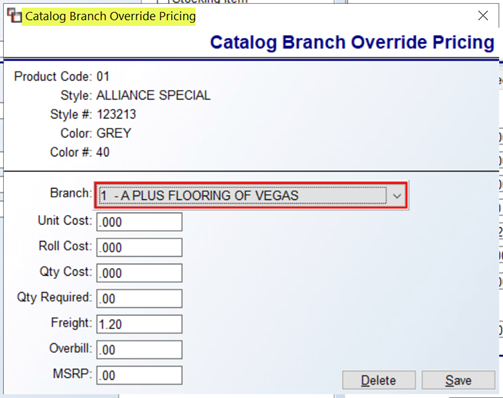 This screen will display any existing Branch Override Pricing and allow for editing/adding. Concerning Freight and Overbill, in the Special Catalog Mtc. (By Product Code) module, if those first two options—Freight and Overbill—are edited, when you hit the Continue button, a Select Branch for Override Pricing screen will prompt for you to select the applicable Branches for the change.