This option allows you to group Payment Codes the way you wish to see them in the Bank Reconciliation program. For example, if you wish for MasterCard, VISA, and Discover charges to appear all together as one Credit Card amount, you can set that up via this option. Use the drop down box to make a grouping selection for each applicable Payment Type Code.
Alternate Bank Rec Grouping
Alternate Bank Rec Grouping There is an option within BMS to create alternate groupings of credit cards that will group together on the Customer Payment Register and in the Bank Reconciliation module. The area of setup appears in the Payment Type Code Maintenance module, which is located in the Sales Processing Setup Programs Menu. In that screen, you will see an option for Alternate Bank Rec Group as follows:
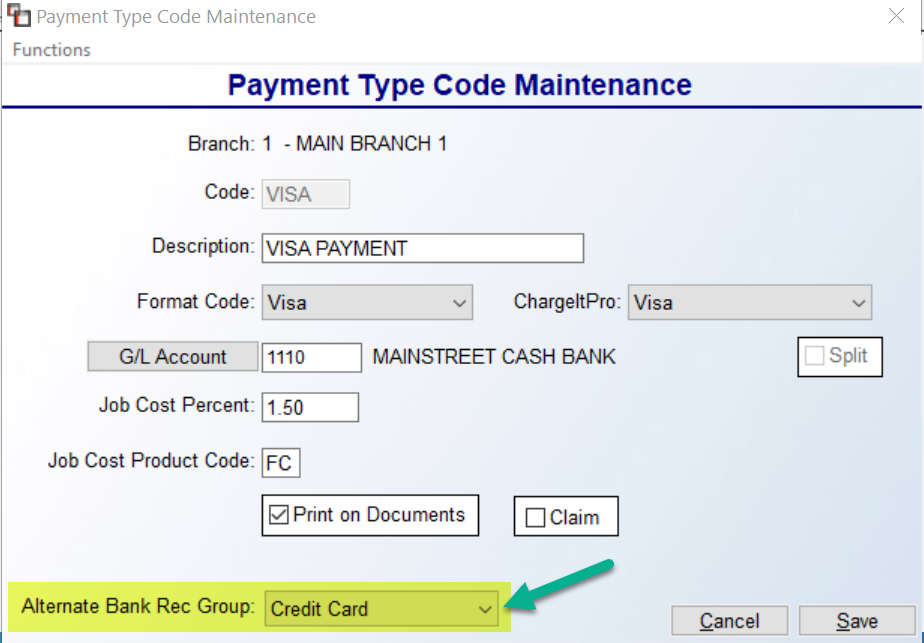
This option allows you to group Payment Codes the way you wish to see them in the Bank Reconciliation program. For example, if you wish for MasterCard, VISA, and Discover charges to appear all together as one Credit Card amount, you can set that up via this option. Use the drop down box to make a grouping selection for each applicable Payment Type Code.
This option allows you to group Payment Codes the way you wish to see them in the Bank Reconciliation program. For example, if you wish for MasterCard, VISA, and Discover charges to appear all together as one Credit Card amount, you can set that up via this option. Use the drop down box to make a grouping selection for each applicable Payment Type Code.