The View A/R button will prompt the Customer Status Inquiry screen for the Customer so the account can be reviewed before processing the Order/Quote.
Credit Alert Account pop up in Order Entry
Credit Alert Account pop up in Order Entry A Credit Alert Status is available in the Customer Maintenance module. When you click on the drop-down arrow in the Credit Status field, you will see the status as follows: A – Credit Alert. When this status is selected, it will not prevent the processing of a Job or Quote, but it will prompt an alert as follows:
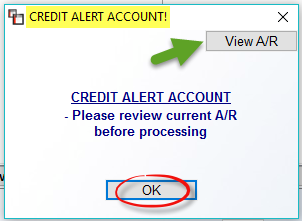
The View A/R button will prompt the Customer Status Inquiry screen for the Customer so the account can be reviewed before processing the Order/Quote.
The View A/R button will prompt the Customer Status Inquiry screen for the Customer so the account can be reviewed before processing the Order/Quote.