Please Note: If a User is not allowed to Edit Catalog, they will not be able to save changes to Attributes. Also, an asterisk on any of the Tab or Button options in the screen above indicates data exists in those screens. To customize/edit these selection and drop-down fields, you will need to navigate to Product Code Maintenance> Functions> Product Type Maintenance>Catalog Attributes>Selection Maintenance and Brand Maintenance.
Catalog Attributes
What are Catalog Attributes and why would I use them? The Catalog Attributes button/functionality has been added to the Catalog Maintenance module to work in conjunction with e-commerce APIs, such as WooCommerce. Not all BMS clients will utilize this feature, so this section is to make you aware and allow you to follow up with support if you believe you would be interested in finding out more. Catalog Attributes are essentially all the data points associated with a catalog item. For example--and especially helpful on a website selling flooring such as hardwood--data on wear layer, edge profile, country of origin, species, etc., can be loaded into BMS for uploading to a website. Although helpful, the amount of work involved in setting this up for several catalog items would be labor-intensive for non-e-commerce clients, so it will generally only make sense for a company interested in pursuing e-commerce. There is a customer-facing import/export feature to allow for easier data entry. It can be downloaded from the Catalog Attributes Export screen, accessible from the options tab at the top left of the screen below. When copying Colors where Catalog Attributes exist, you will be prompted to copy Attributes as well. If Catalog Attributes exist, they can be viewed from the Associated Products (explained below) tab screen. Once setup is complete, a typical Catalog Attribute screen will appear as follows:
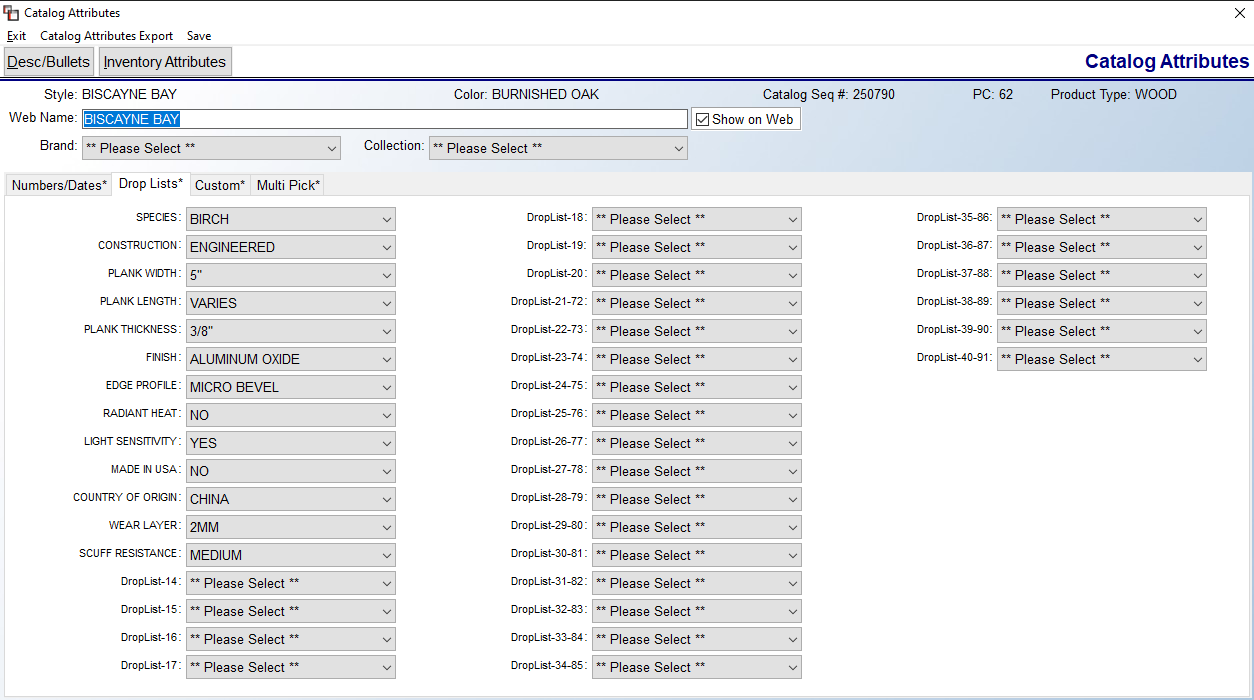
Please Note: If a User is not allowed to Edit Catalog, they will not be able to save changes to Attributes. Also, an asterisk on any of the Tab or Button options in the screen above indicates data exists in those screens. To customize/edit these selection and drop-down fields, you will need to navigate to Product Code Maintenance> Functions> Product Type Maintenance>Catalog Attributes>Selection Maintenance and Brand Maintenance.
Please Note: If a User is not allowed to Edit Catalog, they will not be able to save changes to Attributes. Also, an asterisk on any of the Tab or Button options in the screen above indicates data exists in those screens. To customize/edit these selection and drop-down fields, you will need to navigate to Product Code Maintenance> Functions> Product Type Maintenance>Catalog Attributes>Selection Maintenance and Brand Maintenance.