Alternate Commission Plan
A recent new option for commission has been added to the Salesperson Maintenance module and appears at the top left of the screen as follows: Alternate Commission Plan. This was added for situations where a Salesperson may sell commercial and residential jobs, and their pay structure may be different for each. In this case, rather than have two different Sales IDs to dilute analysis and reporting, this feature allows for tracking alternate plans--up to 20--under the same Salesperson. When you click this option, a box will prompt for you to click Add to access the Alternate Commission Plans box as follows:
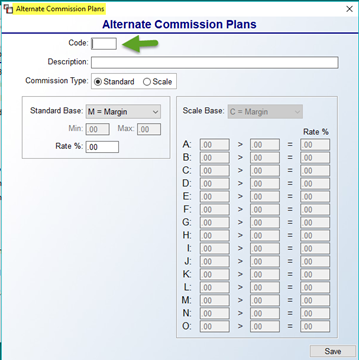
Create a Code for each Plan. You can even create a different Code for Standard and Scale for a Salesperson. It is this Code that will be assigned in the Sales Rep field on the Quote/Job, but the tracking will all stay under the main Salesperson. The drop-down menu will display all Alternate Plans as follows:
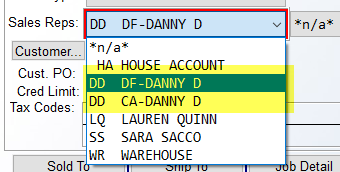
The “DF” and “CA” after the Sales ID denote the two different Codes. An additional feature to this Alternate Commission Plan setup is completely optional and appears in the Job Type Maintenance module. If you use a recurring Code for several Salespeople, you can add the Code to the Job Type Maintenance module, thereby defaulting that Code for the Sales ID selected based on Job Type. That field appears as follows:
Create a Code for each Plan. You can even create a different Code for Standard and Scale for a Salesperson. It is this Code that will be assigned in the Sales Rep field on the Quote/Job, but the tracking will all stay under the main Salesperson. The drop-down menu will display all Alternate Plans as follows:
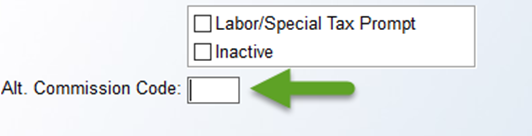
The “DF” and “CA” after the Sales ID denote the two different Codes. An additional feature to this Alternate Commission Plan setup is completely optional and appears in the Job Type Maintenance module. If you use a recurring Code for several Salespeople, you can add the Code to the Job Type Maintenance module, thereby defaulting that Code for the Sales ID selected based on Job Type. That field appears as follows: